Scrolling gallery block
A row of images that scrolls horizontally, on its own or by swiping. The block holds Scrolling gallery item blocks: add one per image with Add block inside the gallery.
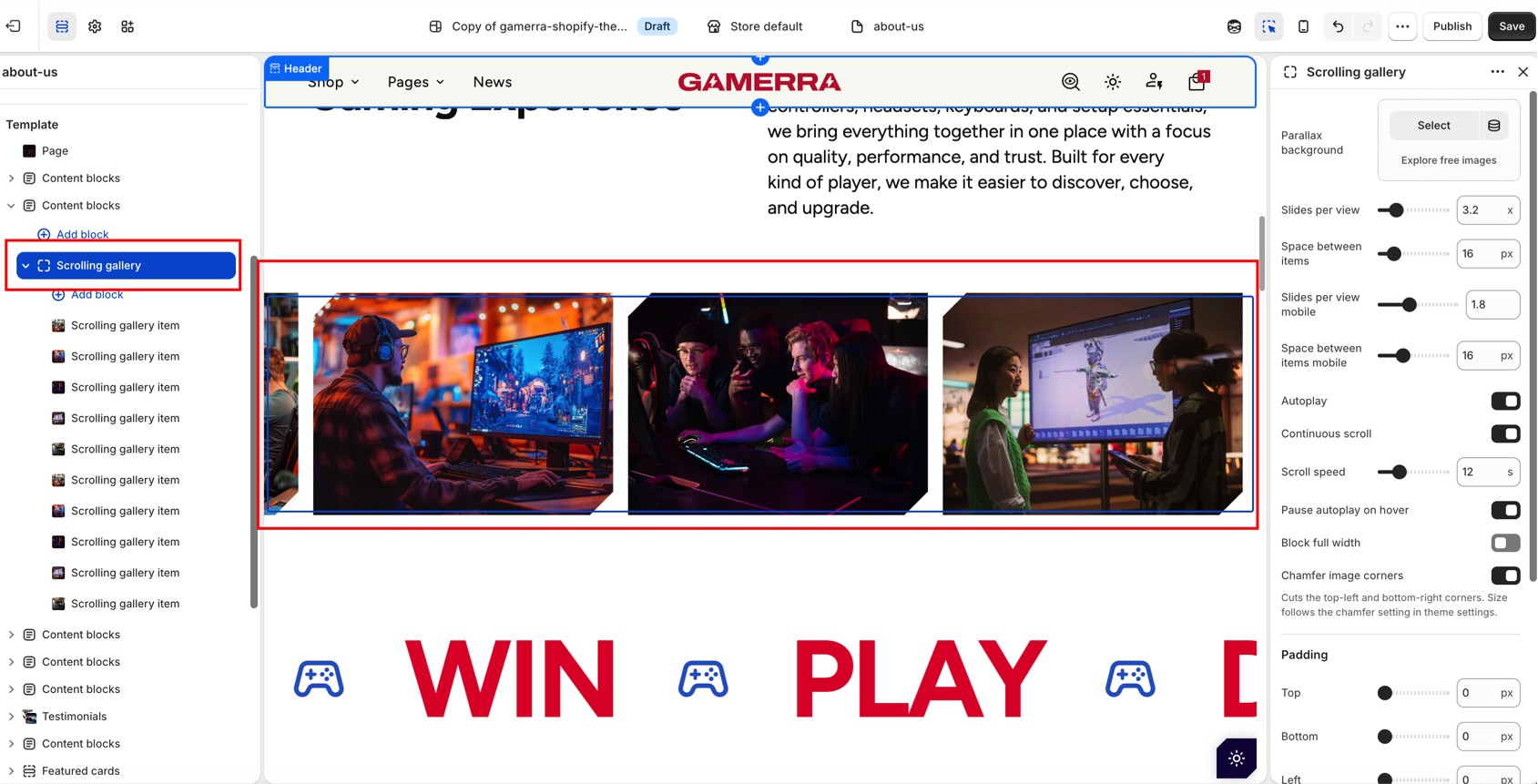
Gallery settings
| Setting |
Description |
| Parallax background |
Optional image shown behind the gallery that moves slower than the items as they scroll. |
| Slides per view |
How many images are visible at once on desktop. A fractional value shows a partial next image. Range: 2–8, step 0.1. Default: 4.2. |
| Space between items |
Space between images on desktop. Range: 0–100 px. Default: 8 px. |
| Slides per view mobile |
How many images are visible at once on mobile. Range: 0.5–4, step 0.1. Default: 2.4. |
| Space between items mobile |
Space between images on mobile. Range: 0–50 px. Default: 8 px. |
| Autoplay |
Scrolls the gallery automatically. Default: On. |
| Continuous scroll |
Moves the images smoothly without stopping, instead of switching one slide at a time. Available only when Autoplay is on. Default: On. |
| Autoplay delay |
Time each slide stays still before moving on. Available only when Autoplay is on and Continuous scroll is off. Range: 2–10 s, step 0.5. Default: 5 s. |
| Scroll speed |
Time for one full pass of the gallery in continuous mode. Higher values scroll slower. Available only when Autoplay and Continuous scroll are on. Range: 6–30 s. Default: 12 s. |
| Pause autoplay on hover |
Pauses scrolling while the pointer is over the gallery. Available only when Autoplay is on. Default: On. |
| Block full width |
Stretches the gallery to the full screen width. Default: Off. |
| Chamfer image corners |
Cuts the top-left and bottom-right corners of the images. The size follows the chamfer setting in Theme settings → Layout. Default: Off. |
Gallery padding
| Setting |
Description |
| Top, Bottom, Left, Right |
Space around the gallery on desktop. Range: 0–200 px, step 2. Default: 0 px. |
| Top mobile, Bottom mobile, Left mobile, Right mobile |
Space around the gallery on mobile. Range: 0–100 px, step 1. Default: 0 px. |
| Setting |
Description |
| Image |
Image of the item. |
| Image ratio |
Shape of the image: Adapt (original proportions), Portrait, Square, Landscape, Wide, Ultra wide or Custom. Default: Adapt. |
| Custom image ratio |
Image height as a percentage of its width. Available only when Image ratio is Custom. Range: 40–160 %, step 2. Default: 100 %. |
| Image position |
Aligns the image to the Top or Bottom of the item, which staggers images of different height. Default: Top. |
| Product |
Optional product. Shows a product tag on the image. |
| Product tag action |
What happens when the tag is clicked: Link to product or Product popup. Available only when a product is selected. Default: Product popup. |

