Team member block
A card with a person’s photo, name, description and links to their social profiles. Add one block per person.
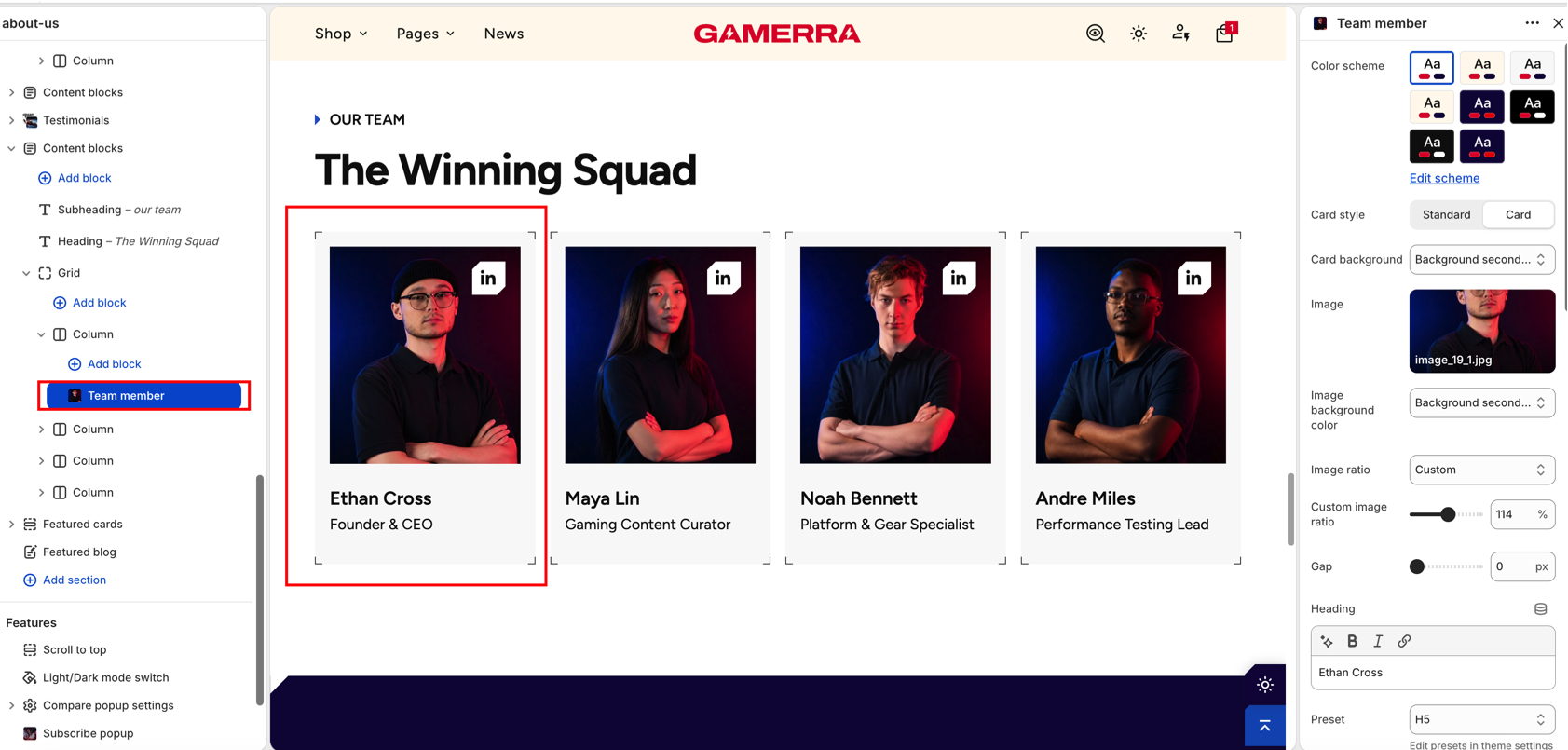
Card
| Setting |
Description |
| Color scheme |
Color scheme of the card. Schemes are managed in Theme settings → Colors. Default: Scheme 1. |
| Card style |
Standard shows the content directly on the page; Card puts the photo and text on a card. Default: Card. |
| Card background |
Background of the card: Background or Background secondary. Available only when Card style is Card. Default: Background secondary. |
| Content color scheme |
Color scheme of the text area. Available only when Card style is Standard. Default: Scheme 8. |
| Gap |
Space between the image and the text. Range: 0–100 px. Default: 0 px. |
Image
| Setting |
Description |
| Image |
Photo of the person. |
| Image background color |
Color shown behind the photo: Background or Background secondary. Default: Background secondary. |
| Image ratio |
Shape of the photo: Adapt (original proportions), Portrait, Square, Landscape, Wide, Ultra wide or Custom. Default: Square. |
| Custom image ratio |
Image height as a percentage of its width. Available only when Image ratio is Custom. Range: 40–180 %, step 2. Default: 100 %. |
Heading
| Setting |
Description |
| Heading |
Name of the person. Supports inline formatting. Leave empty to hide it. The settings below appear only when a heading is entered. Default: Team member heading. |
| Preset |
Typography preset: Hero, H1–H6, Subheading, Caption, Large text, Paragraph or Small text. Presets are edited in Theme settings → Typography. Default: H6. |
| Color |
Text color: Heading, Text or Accent. Default: Heading. |
| Text style |
Letter case: Normal, Uppercase or Lowercase. Default: Normal. |
Description
| Setting |
Description |
| Description |
Short text under the name, for example the role. Supports inline formatting. Leave empty to hide it. The settings below appear only when a description is entered. Default: Team member text. |
| Preset |
Typography preset (same options as the heading). Default: Caption. |
| Color |
Text color: Heading, Text or Accent. Default: Text. |
| Text style |
Letter case: Normal, Uppercase or Lowercase. Default: Uppercase. |
Social accounts
| Setting |
Description |
| LinkedIn |
Link to the person’s LinkedIn profile. |
| Instagram |
Link to the person’s Instagram profile. |
| Facebook |
Link to the person’s Facebook profile. |
| X / Twitter |
Link to the person’s X (Twitter) profile. |
| Custom icon |
Your own icon for another network or link. |
| Custom icon link |
Page the custom icon leads to. Available only when a custom icon is selected. |
| Social icons position |
Where the icons are shown: On image or Next to text. Default: On image. |
| Icon style |
Card places each icon on a filled card; Standard shows the icon alone. Default: Card. |
| Color scheme |
Color scheme of the social icons. Schemes are managed in Theme settings → Colors. Default: Scheme 1. |
| Social icons size |
Size of the social icons. Range: 24–92 px. Default: 40 px. |

