Testimonials settings
A section that shows customer reviews next to a large image or video, with an optional product card on the media. Reviews are added as blocks: add them with Add Testimonial in the section.
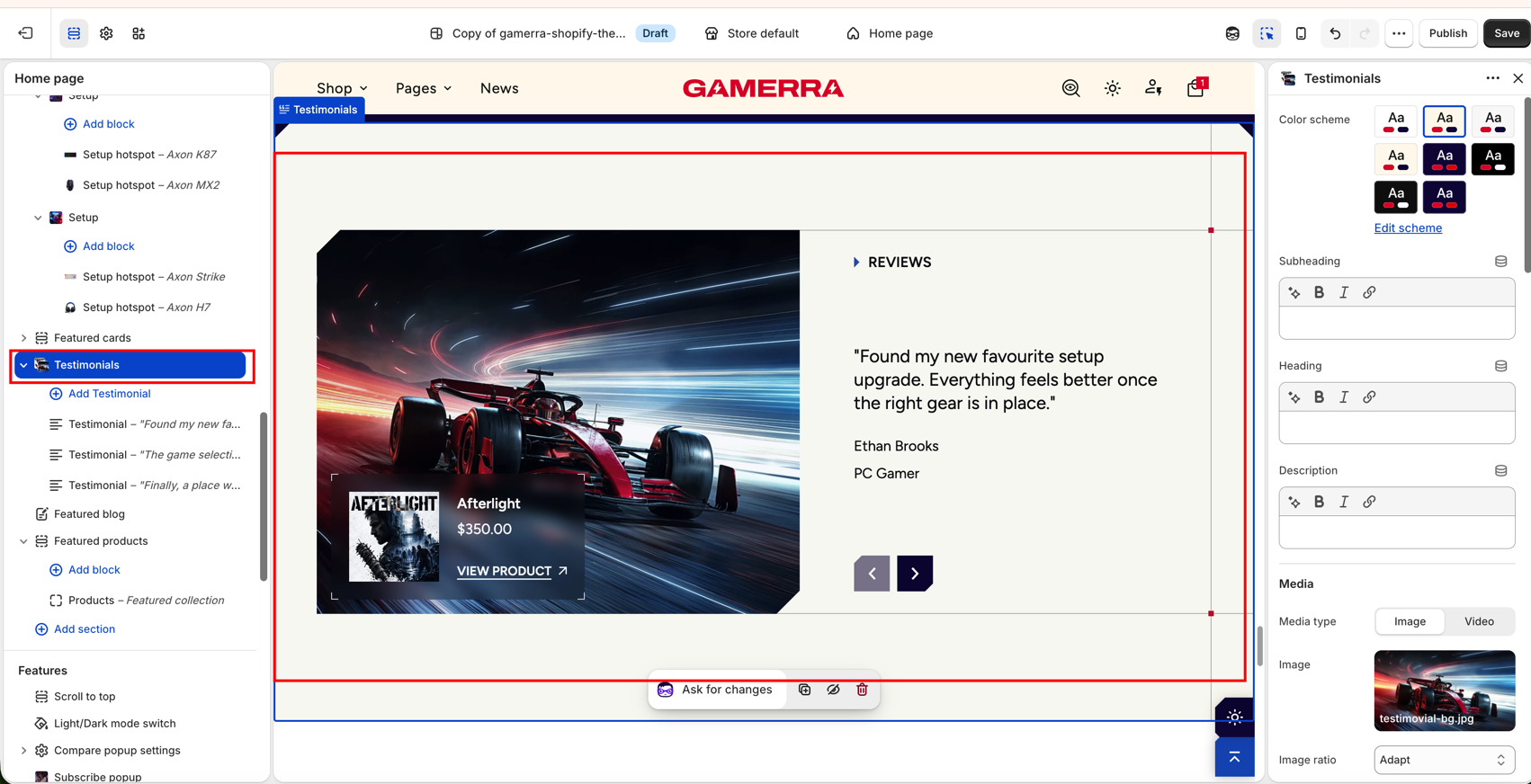
Blocks you can add to the section
- Testimonial: one review. Add one block per review.
Section settings
| Setting |
Description |
| Color scheme |
Color scheme applied to the section. Schemes are managed in Theme settings → Colors; use Edit scheme to jump there. Default: Scheme 1. |
Subheading
| Setting |
Description |
| Subheading |
Short line above the heading. Supports inline formatting. Leave empty to hide it. The settings below appear only when a subheading is entered. |
| Preset |
Typography preset: Hero, H1–H6, Subheading, Caption, Large text, Paragraph or Small text. Presets are edited in Theme settings → Typography. Default: Subheading. |
| Icon |
Decorative icon before the text: None, Dot, Square or Triangle. Available only with the Subheading preset. Default: Triangle. |
| Icon color |
Color of the icon: Heading, Text, Accent or Custom. Available only with the Subheading preset and an icon selected. Default: Custom. |
| Icon custom |
Custom icon color. Available only when Icon color is Custom. Default: #2B62C8. |
| Icon custom dark mode |
Custom icon color used in dark mode. Available only when Icon color is Custom and dark mode is enabled in Theme settings. Default: #2B62C8. |
| Font |
Font family: Heading large, Heading small, Body or Accent. Default: Accent. |
| Color |
Text color: Heading, Text or Accent. Default: Accent. |
| Text style |
Letter case: Normal, Uppercase or Lowercase. Default: Uppercase. |
| Bottom space |
Space between the subheading and the heading. Shown when a heading or description is entered. Range: 0–60 px. Default: 40 px. |
| Bottom space mobile |
The same space on mobile. Range: 0–40 px. Default: 20 px. |
Heading
| Setting |
Description |
| Heading |
Section heading. Supports inline formatting. Leave empty to hide it. The settings below appear only when a heading is entered. |
| Preset |
Typography preset (same options as the subheading). Default: H2. |
| Icon, Icon color, Icon custom, Icon custom dark mode |
Same as for the subheading; available only with the Subheading preset. |
| Font |
Font family: Heading large, Heading small, Body or Accent. Default: Heading large. |
| Color |
Text color: Heading, Text or Accent. Default: Heading. |
| Text style |
Letter case: Normal, Uppercase or Lowercase. Default: Uppercase. |
| Bottom space |
Space between the heading and the description. Shown when a description is entered. Range: 0–60 px. Default: 16 px. |
| Bottom space mobile |
The same space on mobile. Range: 0–40 px. Default: 8 px. |
Description
| Setting |
Description |
| Description |
Text under the heading. Supports inline formatting. Leave empty to hide it. The settings below appear only when a description is entered. |
| Preset |
Typography preset (same options as the subheading). Default: Paragraph. |
| Icon, Icon color, Icon custom, Icon custom dark mode |
Same as for the subheading; available only with the Subheading preset. |
| Font |
Font family: Heading large, Heading small, Body or Accent. Default: Body. |
| Color |
Text color: Heading, Text or Accent. Default: Text. |
| Text style |
Letter case: Normal, Uppercase or Lowercase. Default: Normal. |
| Header bottom space |
Space between the whole header (subheading, heading, description) and the reviews. Shown when any of them is entered. Range: 0–60 px. Default: 40 px. |
| Header bottom space mobile |
The same space on mobile. Range: 0–60 px. Default: 40 px. |
| Setting |
Description |
| Media type |
Whether the section shows an Image or a Video beside the reviews. Default: Image. |
| Image |
Image shown beside the reviews. Available only for the Image media type. |
| Image ratio |
Shape of the image on desktop: Adapt (original proportions), Portrait, Square, Landscape, Wide, Ultra wide or Custom. Available only for the Image media type. Default: Adapt. |
| Custom image ratio |
Image height as a percentage of its width. Available only when Image ratio is Custom. Range: 40–160 %, step 2. Default: 100 %. |
| Image ratio mobile |
Shape of the image on mobile (same options as on desktop). Available only for the Image media type. Default: Adapt. |
| Custom image ratio mobile |
Image height as a percentage of its width on mobile. Available only when Image ratio mobile is Custom. Range: 40–160 %, step 2. Default: 100 %. |
| Video |
Video shown beside the reviews. Available only for the Video media type. |
| Enable autoplay |
Plays the video automatically. Available only for the Video media type. Default: Off. |
Product card
Overlays a compact product card on the media.
| Setting |
Description |
| Show product card |
Shows a product card over the media. The settings below appear only when this is on. Default: Off. |
| Product |
Product shown on the card. |
| Color scheme |
Color scheme of the card. Schemes are managed in Theme settings → Colors. Default: Scheme 1. |
| Card background |
Standard or Blur (a blurred translucent background). Default: Standard. |
| Show vendor |
Shows the product vendor. Default: Off. |
| Show type |
Shows the product type. Default: Off. |
| Show price |
Shows the product price. Default: On. |
| Show button |
Shows a button that leads to the product. The three settings below appear only when this is on. Default: On. |
| Button text |
Text on the button. Default: View product. |
| Button icon |
Icon next to the label: None, Dot, Square, Triangle, Arrow, Caret or Carets. Default: Arrow. |
| Button icon position |
Places the icon to the left or right of the label. Available only when an icon is selected. Default: Right. |
Decor lines
Rules aligned to the media, running to the section edges, with a marker square where they meet the vertical rule.
| Setting |
Description |
| Show decor |
Shows the decor lines. The settings below appear only when this is on. Default: On. |
| Show horizontal lines |
Shows the horizontal lines. Default: On. |
| Show vertical line |
Shows the vertical line. Default: On. |
| Show markers |
Shows marker squares where the lines meet. Default: On. |
| Line thickness |
Thickness of the lines. Available when horizontal or vertical lines are shown. Range: 1–4 px. Default: 1 px. |
| Marker size |
Size of the markers. Available only when markers are shown. Range: 0–20 px. Default: 6 px. |
Shape divider
Cuts the section edge. Add padding so the content doesn’t overlap the cut.
| Setting |
Description |
| Type |
Shape of the cut: None, Triangle corners, Rounded corners, Zigzag, Diagonal (left), Diagonal (right), Chevron notch or Stairs. Default: None. |
| Position |
Which edge is cut: Top, Bottom or Both. Available only when a shape is selected. Default: Top. |
| Top: scheme of the section above |
Color scheme of the neighbouring section above, so the cut shows its background in light and dark mode. Available when the cut is at the top or on both edges. Default: Scheme 1. |
| Bottom: scheme of the section below |
Color scheme of the neighbouring section below, so the cut shows its background in light and dark mode. Available when the cut is at the bottom or on both edges. Default: Scheme 1. |
| Cut size |
How large the cut is on desktop. Higher values cut deeper. Available only when a shape is selected. Range: 50–150 %, step 5. Default: 100 %. |
| Cut size mobile |
How large the cut is on mobile. Available only when a shape is selected. Range: 50–150 %, step 5. Default: 100 %. |
Padding
| Setting |
Description |
| Top |
Space above the section content on desktop. Range: 0–200 px, step 2. Default: 60 px. |
| Bottom |
Space below the section content on desktop. Range: 0–200 px, step 2. Default: 60 px. |
| Top mobile |
Space above the section content on mobile. Range: 0–120 px, step 2. Default: 30 px. |
| Bottom mobile |
Space below the section content on mobile. Range: 0–120 px, step 2. Default: 30 px. |
Custom CSS
The Custom CSS field at the bottom of the section panel is a standard Shopify setting. CSS entered there applies to this section only.

